Kanban Factory
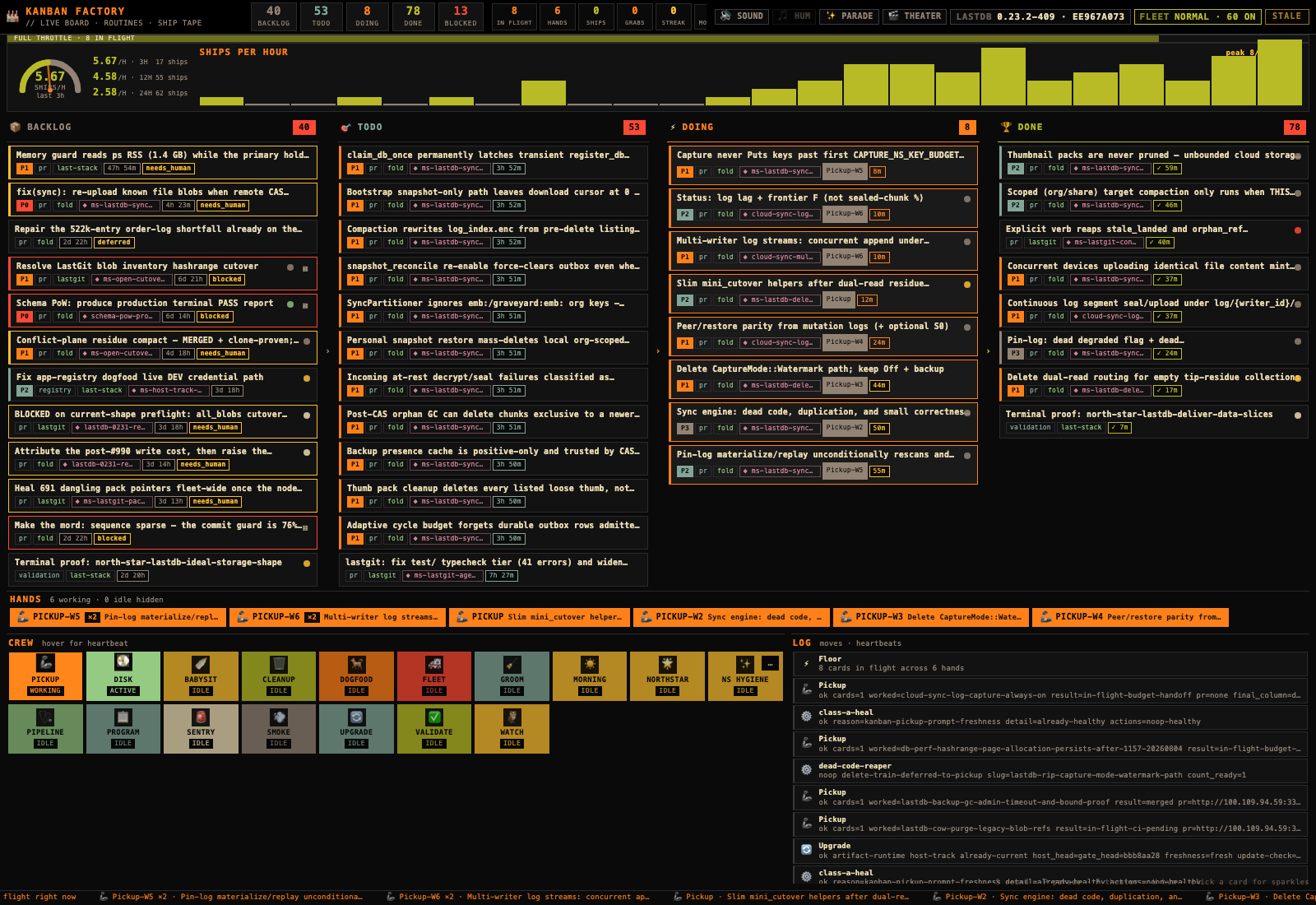
Kanban Factory is a live floor view of the Kanban board you already have. It reads your board every few seconds and animates what actually changed — a card moving lane, a job picking up work, something landing in Done. It never writes to your board.
[Get it →] [Open it →] [Source]
What it does
A board tells you what is open. It does not tell you whether anything is happening. The Factory answers the second question: leave it in a tab, and the room reacts when the board moves.
Everything on screen is your data. The lanes hold your real cards, with their real titles, priority, repo, and blocked state. The crew tiles are your scheduled jobs, lit up when they last fired. The counts in the top bar are counted from the same cards you would get from kanban list.
THE RULE: NO FAKE MOTION
Idle workers bob and belts shimmer — that is atmosphere. But a card only hops when it really changed lane, and the victory sound only fires when something really reached Done. A quiet floor means quiet work. You cannot make it look busy without doing something.
Before you start
LASTDB + KANBAN The Factory reads an existing board. If kanban list works in your terminal, you are ready. If not, start at Install and then How to use it.
NODE 18+ Check with node --version. There is nothing to npm install — the server has no dependencies.
A BROWSER Any modern one. The page is served from your own machine.
Get it
The Factory is a small standalone repository. Clone it anywhere you like — the examples below use ~/kanban-factory.
git clone https://github.com/EdgeVector/kanban-factory ~/kanban-factory
cd ~/kanban-factory
POLL_MS=4000 node server.mjs
That third line starts the server in the foreground and prints the address. POLL_MS is how often it re-reads the board — four seconds makes it feel live; leave it off and it checks once a minute. Keep the terminal open, or read on for the version that starts itself at login.
Open it
Point a browser at http://127.0.0.1:4177. You should see your lanes populate within a few seconds.
Click the page once. Browsers do not allow sound until you interact with a page, so the first click is what unlocks the blips and the ship arpeggio. If you would rather it stayed silent, leave it — or press S.
KEEP IT RUNNING (macOS)
The bundled installer registers a LaunchAgent so the Factory comes back on its own after a reboot, and rewrites its paths to match wherever you cloned it.
~/kanban-factory/scripts/install-launchd.sh install
open http://127.0.0.1:4177
LATER
~/kanban-factory/scripts/install-launchd.sh status
~/kanban-factory/scripts/install-launchd.sh restart
~/kanban-factory/scripts/install-launchd.sh uninstall
Logs land in ~/Library/Logs/kanban-factory.out.log and .err.log. One caveat worth knowing before you file a bug: the LaunchAgent runs Node from /opt/homebrew/bin/node. If your Node came from somewhere else, the foreground command above still works — the agent is the part that will not start.
Reading the floor
Top to bottom, this is what you are looking at.
TOP BAR Live counts per lane, plus how many cards are in flight, how many hands are holding work, and how many shipped this session. The version chip on the right shows which LastDB build you are running.
SHIPS PER HOUR Throughput over the last few hours, with 3h / 12h / 24h rates. This is the honest one — it goes flat when nothing lands.
LANES Backlog, Todo, Doing, Done. Real titles, priority, repo, and any blocked or needs-attention flags. Hover a card for detail; click it for sparkles.
HANDS Who is holding what, right now. If a worker has claimed a card, its chip appears here. Click a hand and the matching card flashes in its lane — a silly interaction that answers a serious question.
CREW One tile per scheduled job, each with a role: the one that grabs ready work, the one that unblocks the backlog, the one that nurses merges. A tile lights up when its job fires; hover for the last heartbeat in plain language.
LOG A running list of detected board moves and job heartbeats — the receipts for everything that just animated.
KEYBOARD
S sound on/off · H factory hum
P parade · F theater mode
V LastDB version panel
M job fleet mode
What it reads, and what it will not do
The Factory is a viewer. It shells out to the same read commands you would type, on a timer, and serves the result to your own browser.
READS Your board’s cards, the heartbeat note your scheduled jobs write, and your local LastDB version. All three are things you can read yourself from a terminal.
DOES NOT Move cards, claim work, edit notes, or change anything on your board. It has no account, no telemetry, and no outbound connection.
ONE EXCEPTION If you run a fleet of scheduled jobs, the Fleet chip can switch them between local profiles (say, a low-credit mode). That is the only button on the page that changes anything, it is on your own machine, and you have to press it.
The server binds 127.0.0.1 only. Nothing on this page is reachable from another machine, which also means there is nothing to lock down before you open it.
If it does not come up
Empty lanes. The server needs the kanban command on its PATH. Confirm kanban list works in the same shell, then restart the server.
Port already in use. Something else is on 4177. Start it elsewhere: PORT=4180 node server.mjs.
Nothing ever animates. Check the poll interval — the default is a minute in the foreground. POLL_MS=4000 node server.mjs makes it feel live.
Is it alive at all? curl -s http://127.0.0.1:4177/api/health returns the card count it last saw.
UPDATING
cd ~/kanban-factory
git pull
~/kanban-factory/scripts/install-launchd.sh restart
Why we built it, and the design argument behind the no-fake-motion rule: The Factory Floor on the Dev Blog. · How to use LastDB · Apps catalog